
Records and reporting
Put the weather record behind the work.
The weather still matters after crews leave the site. Use 4070 to review available observations, compare the season with history and organize site reports. WDS provides formal reporting options for the records your business needs.
Observation context
Understand the conditions behind a location.
Review available site and station history, rainfall and snowfall reports, and seasonal context. Keep the reporting period and source in view when comparing one site, storm or season with another.
- Site precipitation reports
- Record a daily rain or snow total for an eligible saved site and browse the shared report history in your workspace.
- History and normals
- Review historical conditions and relevant station-based normals where coverage is available. A nearby station is a reference, not a measurement taken at your site.
- Your connected station
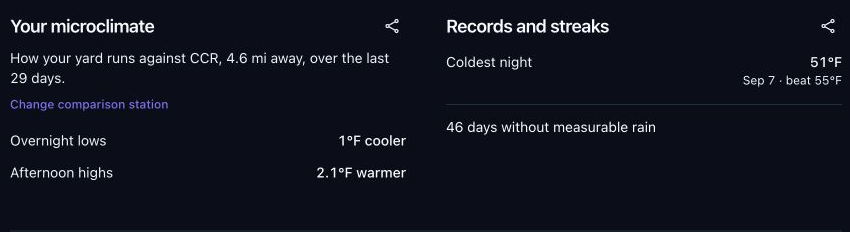
- With a compatible station and enough quality-clean history, compare observed local temperatures with a suitable reference and review records and streaks.
A microclimate profile needs about fourteen quality-clean days. Reference distance and terrain matter; the observed differences do not automatically correct a forecast.
Certified snow reports
Document the storm and the covered location.
Give invoicing, service reviews and insurance discussions a defined weather record with the location, event period and supporting evidence.
See certified snow report options- A specified site and period
- Request a report for a covered location and date range. Available observations and report methodology support the snowfall estimate.
- A report you can review
- Eligible business workspaces can open report details and prepare a PDF or customer summary. Included reporting is defined by the service agreement.
- Standalone reporting options
- Explore a single-storm report or seasonal reporting separately from the full WDS business service.
Forensic weather services
Investigate a specific weather question.
When the issue goes beyond a snowfall total, ask WDS about a report scoped to the event, location, timing and weather conditions in question.
Explore forensic weather reports- Define the question
- Identify the event date, location and weather issue that the report needs to examine.
- Review the available evidence
- The relevant observations, nearby reports and meteorological analysis depend on the case and source coverage.
- Agree the deliverable
- WDS scopes the report and any additional consultation separately. Formal reports are distinct from routine dashboard views and self-reported site observations.
WDS business services · Powered by 4070
Tell us what your weather record needs to answer.
Bring the locations, dates and reporting requirements. We will help identify the right mix of 4070 records, certified snow reports and WDS analysis.
Your proposal defines included locations, reports, briefings and support coverage. Product access follows your workspace and service agreement.